Free Chrome extension

Free AI SEO Checker for Chrome

See how search engines, answer engines and AI assistants read any page, and get a clear fix for each issue. No account or key needed.

Formerly RankToday AI Summarizer. If you already use it, your settings and saved key carry over.

  • No sign-up
  • No key needed for scores
  • Nothing sent to RankToday
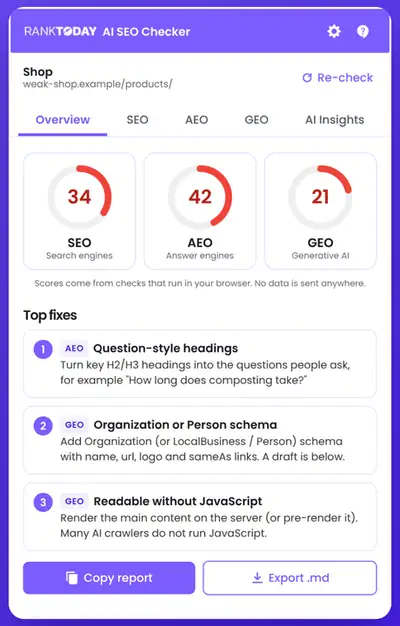
RankToday AI SEO Checker overview tab showing SEO, AEO and GEO scores of 34, 42 and 21 for a test shop page, with the top three fixes: question-style headings, Organization schema and content readable without JavaScript.

Open the extension on any web page and you get a score out of 100 for SEO, AEO and GEO, plus the three fixes that matter most. Every check is marked Pass, Improve, Fix or Couldn't check, with a one-line suggestion. The checks run in your browser.

SEO checks for search engines

Can Google and Bing find, understand and show this page?

  • Title and meta description length
  • A single H1 and headings in the right order
  • Canonical tag, noindex in the meta tag or X-Robots-Tag header, and the language attribute
  • Mobile viewport and HTTPS
  • Image alt text and content length
  • Internal and external links
  • Open Graph and Twitter / X card tags

Want us to fix these across your site? See our SEO services.

AEO checks for answer engines

Can featured snippets, voice assistants and AI answers quote this page?

  • Question-style H2 and H3 headings
  • A direct 40 to 60 word answer right after each question
  • Lists and tables
  • A visible FAQ section
  • FAQPage, HowTo or QAPage schema
  • A summary or key takeaways near the top
  • Short, quotable paragraphs

Want answers from your site quoted more often? See our AEO services.

GEO checks for AI assistants

Can ChatGPT, Claude, Perplexity and Gemini read, trust and cite this page?

  • robots.txt rules for six AI crawlers: GPTBot, OAI-SearchBot, ClaudeBot, PerplexityBot, Google-Extended and CCBot
  • Whether your site has an llms.txt file
  • JSON-LD structured data, including Organization, LocalBusiness or Person schema with name, url, logo, sameAs and address
  • Article or Product schema with author and dates
  • A visible author and date, citations to outside sources, and specific facts and numbers
  • How much of the text is in the HTML before JavaScript runs
  • If schema is missing, a ready-to-edit Organization or Article JSON-LD draft built only from what is on the page, with [ADD ...] placeholders for anything unknown

Want your business cited in AI answers? See our GEO services.

Optional

Optional AI Insights with your own OpenAI key

Add your own OpenAI API key to go further. Each analysis runs only when you click Run AI analysis, and OpenAI bills your account for it.

  • How AI sees this page: what it is about, who it is for, and anything that could confuse an AI about who is behind it
  • Five suggested FAQs from the page text, each answered in 40 to 60 words, with FAQPage JSON-LD you can copy
  • Answer-first rewrites for question sections that do not open with a direct answer
  • A page summary with key insights and keywords
  • Output in 11 languages, including English, Spanish, Arabic, Urdu and Hindi

The AI is told to use only facts from the page and never to invent names, prices, numbers or claims.

How it works

  1. 1

    Add it to Chrome

    Install the extension from the Chrome Web Store. No account is needed.

  2. 2

    Open it on any page

    Click the icon or press Alt+Shift+S (Control+Shift+S on Mac). You get SEO, AEO and GEO scores and the three fixes that matter most.

  3. 3

    Fix and re-check

    Make the changes, then click Re-check. Copy the report or export it as a Markdown file to share with your team.

Your data stays with you

  • Page analysis runs in your browser when you open the extension. It does not run in the background or record the pages you visit.
  • To check crawler rules and JavaScript rendering, it reads robots.txt, llms.txt and the page's HTML from the same website, without your cookies.
  • Nothing is sent to RankToday. There are no analytics, ads or trackers.
  • AI features send page text to OpenAI only when you click Run AI analysis, using your own key.
  • Your key is stored only on your device. You can remove it at any time in Settings.

Read the extension privacy policy

Chrome does not let extensions read some pages, such as Chrome settings pages, the Chrome Web Store and PDFs in Chrome's viewer.

Questions about the AI SEO Checker

Is the RankToday AI SEO Checker free?

Yes, the extension is free to install and the SEO, AEO and GEO checks need no account and no API key. The optional AI Insights use your own OpenAI API key, so OpenAI bills your account for each AI analysis. RankToday does not charge for the extension.

What is the difference between SEO, AEO and GEO?

SEO helps a page rank in search engines like Google and Bing. AEO, or answer engine optimization, helps a page get quoted in featured snippets and voice answers. GEO, or generative engine optimization, helps a page get read, trusted and cited by AI assistants like ChatGPT, Claude, Perplexity and Gemini.

How do I check if AI crawlers can read my website?

Open the extension on any page of your site and go to the GEO tab. It reads your robots.txt file and shows whether GPTBot, OAI-SearchBot, ClaudeBot, PerplexityBot, Google-Extended and CCBot are allowed or blocked for that page. It also checks how much of your text loads without JavaScript.

Does the extension send my data anywhere?

No, the SEO, AEO and GEO checks run in your browser and nothing is sent to RankToday. Page text goes to OpenAI only when you click Run AI analysis, using your own key. Your key is stored only on your device. The extension has no analytics, ads or trackers.

What is llms.txt and does my site need one?

An llms.txt file is a plain Markdown file at the root of your site that lists your most important pages for AI tools. It is a new proposal that some AI tools read, so it is optional. The extension tells you whether your site has one, and our free llms.txt generator can create a first draft.

Will a high score guarantee rankings or AI citations?

No, a high score does not guarantee rankings or citations. No tool can see exactly how Google or an AI model ranks a page. The scores measure common best practices that make a page easier to find, quote and cite, so treat them as a checklist of fixes.

Want this checked across your whole site?

The extension checks one page at a time. We can review your whole site for SEO, AEO and GEO, tell you what to fix first, and do the work for you.

Reach Out

571-424-2822 hasan@ranktoday.com
818 18th St NW Ste 810 1324, Washington, DC 20006, United States
© 2026 RankToday
RankToday logo

Grow your business

Contact Form (Latest)